Activate IPv6 Support for SeaTable
SeaTable supports IPv6 in general. There is no special activation required.
Docker and IPv6
Problem
There is one area that requires additional attention. Docker, by default, does not assign IPv6 addresses to its containers; instead, containers receive only IPv4 addresses.
Requests arriving via an IPv6 connection still reach SeaTable. However, a problem arises for services like nginx or SeaTable that log the source IP address. Every incoming IPv6 request is logged with the Docker network gateway IP address (e.g., 172.18.0.1), not the client’s actual IPv6 address. In the following screenshot, you can see that Thierry connected from an IPv6 address.
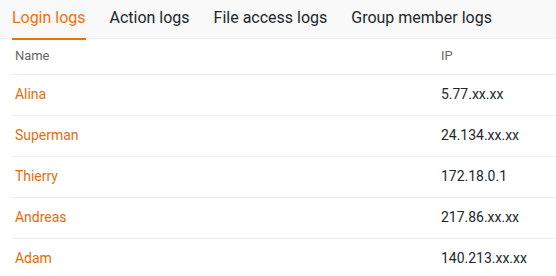
You can confirm this by running docker inspect seatable-server:
[
    {
        ...
        "Networks": {
            "frontend-net": {
                ...
                "Gateway": "172.18.0.1",
                "IPAddress": "172.18.0.5",
                "IPv6Gateway": "",
                "GlobalIPv6Address": "",
                ...
            }
        }
    }
]
While this does not cause immediate service disruptions, it presents some challenges: - Incorrect client IPs are logged. - Rate limiting or other IP-based limits may behave incorrectly.
Solution
The solution is straightforward. Add the following parameter to your Docker network configuration (for example, in caddy.yml):
networks:
  frontend-net:
    name: frontend-net
    enable_ipv6: ${ENABLE_IPV6:-true}
This enables IPv6 addressing for the container and ensures accurate logging of client IP addresses. Starting with SeaTable version 6.0, this feature is enabled by default.
Setups without IPv6
What if IPv6 is completely diabled on your server?
If IPv6 is completely disabled, Docker may fail to start containers with errors such as:
cannot read IPv6 setupcannot assign requested addressfailed to start container ... error="driver failed programming external connectivityerror response from daemon: attaching to network failed
In this case, set ENABLE_IPV6=false in your .env file to disable IPv6 support in Docker, allowing containers to start successfully.